Receiver and Linecard ssettings
We need to create a receiver/linecard configuration matrix to handle the receivers and site numbers coming in to the receivers. We can see the details of the receivers and linecard in the main table. To add a new configuration of the receiver of linecard at hand, click on the Add button on th etop right corner. You should see the following modal:
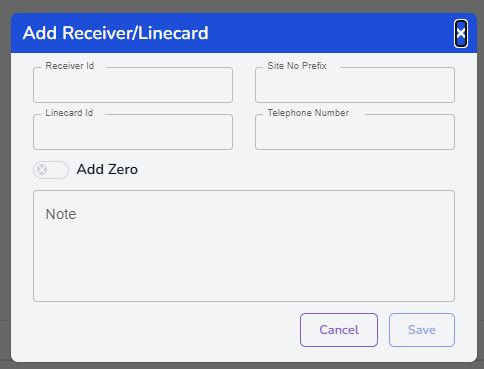
Enter the ID of the receiver in the first field. This is generally programmed on the receiver
Enter the Site number prefix into the next field. The site number prefix is the prefix that we put infront of the site number when a signal is received by this receiver and/or line card. Older panels have 4 digit account ID's. So our normal capacity is 0001-9999 which is about 10,000 accounts. What do we do if we have more than 10,000 accounts? Firstly make sure the phone number is in a PaBX group that is assigned just to this receiver. Now we know what receiver it is comming to, so we just add the prefix number to the site number. So say we get a signal from site 3100. The signal is always coming to receiver number 3. I added the receiver prefix to this window as number 33. Son now when a signal comes from site number 3100, ATraq Communicator will add the 33 to the beginning. So the incoming account ID will be 333100.
Enter the ID of the Linecard if you wish to have this numbering system for your linecards as well.
Last but not least, enter the phone number of the linecard.
The Add zero switch is generally used when we want to add zero's to the account number if it is short than 4 digits.
Finally add any notes for this in the notes screen.